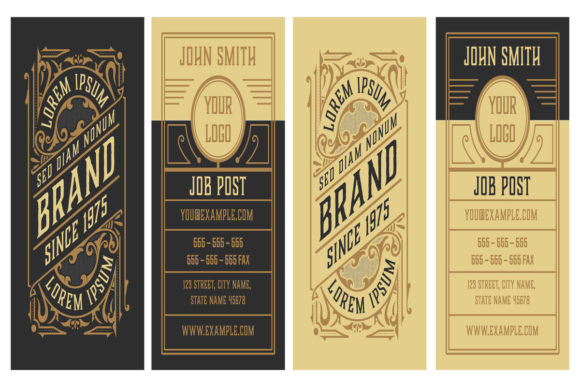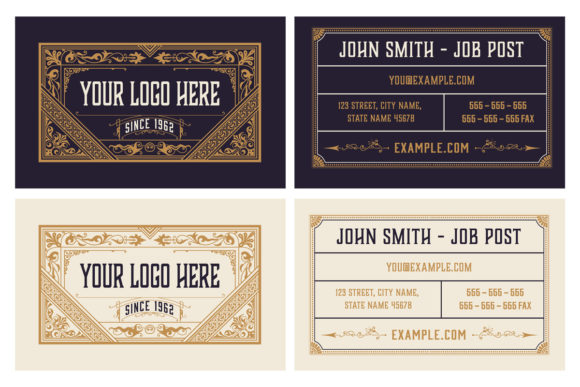
Vintage Luxury Business Card in Two Colors
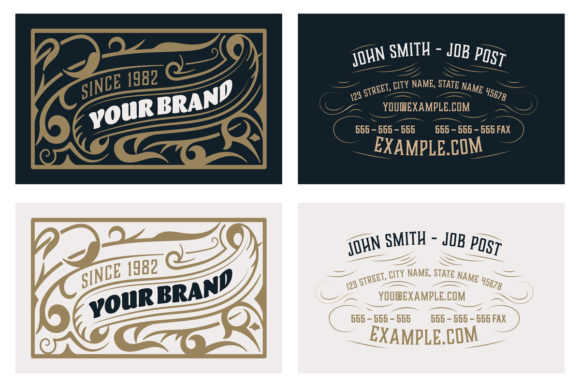
If you're drawn to timeless elegance, subtle sophistication, and a tactile sense of history—without sacrificing modern usability—you’ve likely considered the Vintage Luxury Business Card in Two Colors. This isn’t just another retro template. It’s a thoughtfully crafted design resource built around restraint: two carefully balanced hues, an ornamental frame with graceful flourishes, and a background that evokes early 20th-century print craftsmanship—but remains crisp, legible, and professional at any scale.
What makes it especially useful is its dual-purpose flexibility: it works equally well as a finished business card *and* as a foundational layout for logos, letterheads, or even social media banners. The included EPS and JPG files mean you’re covered whether you’re printing professionally (EPS for vector precision) or sharing digitally (JPG for fast previews). And because it ships with global color swatches and CMYK-ready values, you’re not guessing how your brand colors will translate from screen to press.
Common Missteps—and Why They Matter
Many people assume “vintage” means “automatically elegant”—but that’s where problems begin. A poorly chosen vintage aesthetic can unintentionally signal outdatedness, lack of attention to detail, or even amateurism—especially in industries like finance, law, consulting, or premium retail. One frequent oversight? Using the Vintage Luxury Business Card in Two Colors without adjusting contrast between text and background. Its ornamental flourishes and textured base are beautiful—but if your name or contact info sits directly over a busy section of the frame, readability suffers. That’s not a design flaw—it’s a customization step many skip.
Another quiet pitfall: treating the two-color limit as a restriction rather than a strength. Some users try to force in a third accent color—say, a neon green icon or bright blue URL—to “modernize” the look. But that breaks the visual harmony the template was designed to deliver. The power of this design lies in its discipline. When you add extra colors, you dilute its luxury cues: symmetry, balance, and intentional emptiness.
What to Check Before You Customize
Before dropping your logo or typing your title into the template, pause and verify three things:
- Your font pairing: The ornamental frame leans classic—so avoid ultra-thin sans-serifs or overly playful scripts. A sturdy serif (like Garamond or Playfair Display) or a refined slab (like Rockwell or Arvo) complements the structure without competing.
- Your text hierarchy: The template doesn’t dictate hierarchy—it invites you to define it. Ask yourself: Is your name the dominant element? Is your title secondary but still clear? Does your phone number or email stand out *enough*—not just in size, but in spacing and weight?
- Your print-safe margins: Even though the EPS file is vector-based, some printers trim tightly. Always check that critical text stays at least 3 mm inside the edge—especially near the corners where flourishes often extend.
One real-world example: A freelance branding consultant used the Vintage Luxury Business Card in Two Colors for her launch, but placed her website URL along the very bottom edge—in a light gray, against a slightly textured gradient. At first glance, it looked polished. In practice? Clients missed it entirely. She repositioned the URL higher, increased the weight to bold, and shifted it to the primary color. Response rates to her follow-up emails jumped—not because the content changed, but because the call-to-action became reliably visible.
Better Customization Habits—Simple but Impactful
You don’t need advanced design skills to use this template well. You do need intentionality. Start by locking down your two core colors *before* opening the file. Use the provided CMYK swatches as anchors—not suggestions. If your brand uses Pantone 185 C and Cool Gray 9 C, stick to those. Don’t swap in RGB equivalents or approximations unless you’re certain your printer supports RGB-to-CMYK conversion without shifting warmth or depth.
Also resist the urge to over-customize the frame itself. The ornamental border isn’t decorative filler—it’s structural punctuation. Cropping it, stretching it, or recoloring individual flourishes often weakens the overall rhythm. Instead, let it breathe. Use whitespace deliberately: center-align key lines, leave consistent padding between elements, and trust the template’s natural cadence.
And remember—this isn’t just about aesthetics. A well-executed Vintage Luxury Business Card in Two Colors signals consistency, care, and confidence. It tells people you understand your audience’s expectations *and* your own brand’s voice. That impression lingers longer than any tagline.
Final Practical Notes
If you’re evaluating similar templates online, compare more than just visuals. Look for: clear CMYK documentation (not just RGB previews), editable layers (especially for text and color swatches), and explicit guidance on safe zones and bleed. Many “vintage” designs look stunning as thumbnails but fall apart when printed—either due to low-resolution JPGs, missing fonts, or unadjusted halftones.
Also consider scalability. The Vintage Luxury Business Card in Two Colors includes both EPS and JPG—meaning you can adapt it beyond standard 3.5" × 2" cards. Need a matching Instagram highlight icon? Resize the central emblem. Building a mini brochure? Repurpose the frame as a section divider. Its simplicity is what makes it versatile.
Lastly—don’t underestimate the value of restraint. In a world saturated with gradients, animations, and maximalist layouts, choosing a two-color vintage design is a quiet act of clarity. It says: *I know who I am, who I serve, and what matters most in this moment.* That kind of alignment doesn’t come from software—it comes from thoughtful selection, careful execution, and respect for the craft behind the template.